

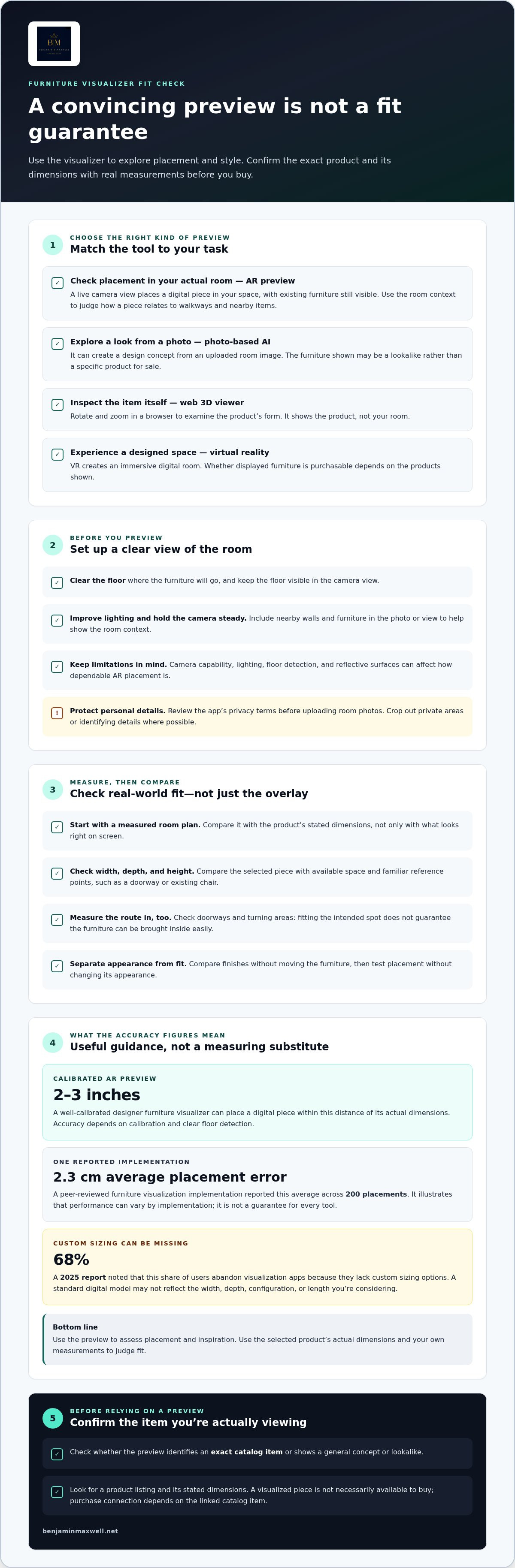
A room preview can look convincing and still leave you guessing about fit. A well-calibrated designer furniture visualizer can place a digital piece within 2-3 inches of its actual dimensions, but manual measurement remains important before you buy. For room planning, the strongest options are those that show real product dimensions and let you assess scale in your own space.
It’s natural to want more than an attractive image: you need to know whether a sofa suits your room, whether its proportions feel right, and whether you can actually buy the piece shown. This guide compares room-design tools, explains how their sizing accuracy differs, and outlines what to check before choosing a visualized item.
You’ll also find practical criteria for judging a tool, from how it places furniture to whether it displays your existing room or generates a new design. Use these points to choose a visualizer that supports a considered decision, not just a beautiful first impression.
Key Takeaways
- Match the tool to your task: preview a real item in your room, explore a design from a photo, or inspect a product in a browser.
- Use room measurements and product dimensions to judge fit; a convincing visual preview alone can’t settle every sizing question.
- Learn how to assess placement, scale controls, and ease of use when comparing furniture visualization tools.
- Find out why seeing a piece in a generated room doesn’t necessarily mean that exact item is available to buy.
Can I actually buy the furniture shown in AI room visualizers?
Sometimes. A preview may use a purchasable catalog item, or generate a lookalike that isn’t a listed product. With photo-based AI visualization, you can upload a living room photo and a product image to see how the piece might appear. Treat the image as a design reference unless it identifies a specific catalog item and provides a way to purchase it.
Prepare your room before using a camera-based visualizer. Clear the floor where you plan to place the item, improve the lighting, and photograph the space from an angle that shows nearby walls and furniture. Keep the camera steady and the floor visible. A clear view helps the tool place its model in relation to features in the room.
Augmented reality (AR) places a digital piece in your actual room through a camera. You need to be there and point your phone at the space; existing furniture remains visible behind the 3D model. This real-room context can help you judge how a dining table relates to chairs, walkways, and surrounding pieces. A web-based 3D viewer serves a different purpose: it lets you rotate and zoom in on an item in a browser. Virtual reality creates an immersive digital room, while photo-based AI can create a redesign from an image without you standing in the room.
Room photos may show personal belongings, family photographs, or details of your home’s layout. Review the app’s privacy terms before uploading, and crop out private areas or identifying details where possible.
| Option | Room context | Purchase connection | Best use |
|---|---|---|---|
| Photo-based AI | Uploaded room image | May show a concept or product image | Exploring styles |
| AR preview | Live camera view | Depends on linked catalog item | Checking placement |
| Web 3D viewer | Product view, not your room | Product page may offer purchase | Inspecting form |
| Virtual reality | Immersive digital room | Depends on displayed products | Experiencing a design |
Choose a tool that fits your goal, then confirm the displayed item’s identity and dimensions before using the preview to guide a purchase.
How I tested Furniture Visualizer tools?
Start with your task: planning a layout, comparing finishes, or placing a single chair. Then assess how clearly each tool supports that decision.
Choosing a Visualizer for Your Needs
Choose a camera-based tool to place furniture within a real room view. Select a web 3D viewer when rotating and zooming into a product matters more than room context. For broader interior design planning, use software that lets you arrange multiple pieces into layouts. Some room visualizers offer iPhone and Android apps, while web viewers run in browsers; available functions vary by platform. Match the format to where you’ll work.
Before testing, define a practical task, such as fitting a dining table beside your existing chairs. Compare how easily each tool takes you from its catalog to a room preview. The right fit supports your decision without unnecessary steps.
Scale and Furniture Style Choices
Start with a measured room plan, then compare the preview with the product’s stated dimensions. Place a sofa or dining table near familiar reference points, such as a doorway or existing chair. These help you judge scale more reliably than an isolated object against an empty background.
Test styles, finishes, and layouts separately. Change a table’s finish without moving it, then move it without changing its appearance. This helps distinguish visual preference from spatial fit. A designer furniture visualizer is most useful when its controls make these comparisons clear.
Brands with Room Visualizer Tools
Some furniture previews connect directly to selected catalog listings. Look for an AR or room-view option beside the product, and check whether it shows the exact item or only a general design concept. A preview linked to a specific listing makes it easier to move from visualization to product details.
Which furniture brands offer room visualizer tools? Availability varies, so start on the product page and look for preview controls. Are furniture visualizers available for iPhone, Android, and web browsers? Tools may be offered as phone apps or browser viewers, with features varying by platform. Compare the same chair or table across available formats to see which provides the detail you need.
How accurate are AR furniture visualizers for sizing?
A calibrated AR preview can place furniture within 2-3 inches of its actual dimensions. That accuracy depends on proper calibration and clear floor detection, so the screen image remains a guide rather than a substitute for measuring. Before purchasing a sofa, measure its width, depth, and height, then compare those figures with the room’s available space. Check doorways and turning areas too, since a piece can fit its intended spot but still be difficult to bring inside.
Custom sizing is a particular weakness. A visualizer may display a standard model without letting you adjust its width, depth, or configuration. A 2025 report noted that 68% of users abandon visualization apps because they lack custom sizing options. For instance, if a kitchen bench or sectional is available in several lengths, a fixed digital model may not match the version you’re considering. Use the preview for placement and inspiration, then compare the selected version’s actual dimensions with your measurements.
AR also depends on the device camera, room lighting, and the tool’s ability to detect the floor. Poor lighting or a reflective surface can make placement less dependable. One peer-reviewed furniture visualization implementation reported an average placement error of 2.3 centimeters across 200 placements, illustrating how performance can vary by implementation. Treat a good-looking overlay as a spatial reference, not a measurement instrument.
Free tiers and render limits affect how much you can test, but they don’t establish whether a furniture model is accurate. A tool may limit saved layouts, available pieces, or image generations. Compare the features you need before planning a full room, especially if you want to test different sofa positions or finishes. Regardless of the tool’s version or rendering allowance, measure critical dimensions yourself.
Furniture visualization tool testing criteria
For a useful comparison, keep the room and furniture constant. Use the same interior, such as a bedroom, and test the same chair in each tool. This helps reveal whether differences come from the visualizer or from changing conditions. Assess placement, product detail, responsiveness, and how easily you can browse the catalog, not just appearance.
Use a repeatable sequence to test each tool. Open the same room view and place an item near a wall. Move it beside a doorway, rotate it, and compare its displayed scale. Then check whether the preview shows the actual product’s material and finish or only a generalized model. This shows how well the tool supports practical decisions.
- Placement: Does the model stay anchored when you change camera position?
- Scale: Can you compare the item with a measured room plan?
- Product detail: Are the material, finish, and shape recognizable?
- Control: Can you move, rotate, and remove pieces without restarting?
- Performance: Does the scene remain responsive as objects accumulate?
Performance matters in a furnished room. One visualization implementation sustained 32 frames per second with up to five concurrent objects. Use that as a useful benchmark, not a universal guarantee. Add a sofa, side table, lamp, and chair, then observe whether movement remains smooth. A sluggish scene can make precise placement harder.
Separate visual polish from practical value. A bedroom render may look elegant but omit the chair’s actual dimensions or finish. A useful tool lets you inspect those details while comparing arrangements. Record the same observations for each option, and prioritize accurate placement and product detail over decorative effects.
Use these criteria to assess a real-room preview with your own furniture choices. Explore an in-home room preview as a practical next step.
Benjamin & Maxwell: Daum Crystal
Benjamin & Maxwell brings together Daum Crystal, Cattelan Italia Furniture, and an In Home Visualizer for readers considering furnishings in their own space. After comparing visualization tools, use the visualizer as a way to explore how furniture might relate to your room, then consider the actual pieces and their dimensions as you refine your choice.
For a room where furniture and decorative objects should feel composed together, explore Cattelan Italia Furniture alongside Daum Crystal. Kosta Boda Glassware offers another design direction for considering the character of a space. The right next step depends on what you’re selecting: room visualization can help frame furniture choices, while browsing the available pieces lets you consider their form and presence more closely.
For questions about the offerings or to continue exploring, contact Benjamin & Maxwell.
Bring Your Room Plan Into Focus
Move beyond imagining a beautiful room: save the arrangements you like, note which pieces deserve a closer look, and consider how each choice fits your space and preferences. A designer furniture visualizer can help you explore options, while your measurements and personal taste guide the final selection.
Benjamin & Maxwell offers an In Home Visualizer, Cattelan Italia furniture, and Daum Crystal. Explore furnishings and decorative accents as part of a considered interior rather than as isolated choices. Browse the pieces that suit your room and sense of style.
Explore Benjamin & Maxwell’s furniture and home offerings, and take the next step toward a space that feels distinctly your own.
Benjamin & Maxwell for Designer Furniture Visualizing
Benjamin & Maxwell brings together designer furniture and home décor, including Cattelan Italia, Bonaldo, Per/Use, and Italia Lounge, as well as sofas, chairs, tables, consoles, and outdoor furniture.
After using a designer furniture visualizer, explore Benjamin & Maxwell’s selection of furniture, Daum Crystal, Kosta Boda glassware and décor, and Schuller home décor.
Frequently Asked Questions
How do I create a realistic 3D room render?
Start with a clear room photo or measured layout, then add furnishings in a deliberate order. Place larger pieces, such as a sofa or bed, before adding side tables and lamps. Keep the camera angle consistent as you compare arrangements. Choose finishes that complement the room’s existing surfaces, and avoid adding so many decorative objects that it becomes difficult to judge scale.
What's the difference between virtual staging and furniture visualization?
Virtual staging adds furniture and décor to an empty or sparsely furnished property image, often to suggest how it could be used. Furniture visualization helps you consider specific pieces in a room, whether through a photo, a 3D model, or an augmented-reality view. For example, staging can establish a living room’s mood, while visualization can help you assess a particular chair’s placement.
What are the best designer furniture visualizer tools?
The best choice depends on what you want to decide. Photo-based tools help explore a room concept, augmented reality previews items in your actual space, and browser-based 3D viewers let you inspect product form. For a complete layout, choose a room-planning tool that supports multiple furnishings. Compare how each handles product detail, arranging objects, and saving designs for later reference.
How do furniture visualizers use augmented reality or 3D models?
Augmented reality uses a device camera to show a digital furniture model within a view of your surroundings. A 3D model supplies the object’s shape and appearance, which the tool renders as you move or rotate it. Some visualizers also let you reposition items or save a scene. These interactions make it easier to compare arrangements than viewing a fixed product photograph alone.
How accurate are furniture visualizers for scale, color, and materials?
Scale depends on the product model’s dimensions and how accurately the tool places it in your room. Color and material appearance may shift with screen settings, room lighting, and the way the digital model represents reflective surfaces or textured upholstery. Compare finishes in different lighting, and consult product specifications when choosing materials such as wood, glass, or fabric.
Can I upload a photo or floor plan to a furniture visualizer?
Many photo-based visualizers let you upload a room image and place selected furniture within it. Floor-plan imports are a separate feature: some tools accept a plan, while others require you to build the room manually. A clear, straight-on photo helps you explore appearance; a floor plan can help map adjoining spaces and circulation.

Article by
Spencer Kay
Spencer is the founder and CEO of Benjamin & Maxwell and has created the most advanced technology-based website in the furniture industry. He has extensive experience in both technology and business operations having started a number of technology companies. Spencer holds a BA Degree in Economics and an MBA in International Business
Disclaimer
Benjamin & Maxwell does not intend for any of our products to be used for any specific purpose.


